Size: 178KB
Publisher: Visit Website
Release Date: 2009-06-19
Submit Date: 2009-06-19
OS: Win 9x/ME/NT/2K/XP/2K3/Vista
Downloads: 782
Publisher's Description
Arles Download Manager is a simple and efficient download manager. It´s portable, only 200KB, simply click and use.
It includes special support for RapidShare Premium Download at the maximum velocity possible with your connection. Lix.in protection links resolve capacity. Easily download Google and YouTube videos.
Requires Microsoft .NET Framework 2.0.
What's New in version 1.8.0.6:
* Rapidshare increased the wait time for free downloads. 
Saturday, June 20, 2009
Arles Download Manager 1.8.0.6
Thursday, June 18, 2009
Cara Membuat Read More pada Blogspot
Jika kita menulis posting pada blogspot, tulisan kita akan dimunculkan secara keseluruhan pada halaman depan. Ini mengakibatkan blog kita akan penuh dengan tulisan yang panjang ketika dibuka. Saat ini blogspot memang belum menyediakan fungsi "read more" ketika menulis posting. Harapannya sih bakal ada. Berbeda halnya dengan Wordpress CMS yang telah menyediakan tool pada bagian penulisan posting yang berfungsi untuk membagi tulisan yang akan tampil pada halaman utama (depan).
Fungsi "Read More" atau "Baca Selengkapnya", atau "Continue Reading" seperti pada blog ini adalah untuk membagi postingan menjadi 2 bagian sehingga yang muncul di halaman utama hanya sebagian saja, sedangkan untuk melihat isi keseluruhan bisa dilakukan dengan mengklik link "Read More" tersebut. Meskipun blogspot tidak menyediakan tool membuat Read More, kita masih bisa membuat Read More tersebut pada postingan kita dengan cara merombak sedikit template Blogspot yang kita gunakan. Ada 2 cara membuat Read More pada blogspot yang bisa kita gunakan:
CARA PERTAMA
1. Login ke akun blogspot pembaca.
2. Pada dasbor, klik link Tata Letak, kemudian pilih submenu Edit HTML.
3. Back up terlebih dahulu template blogspot pembaca agar jika terjadi kerusakan, masih bisa mengembalikan ke kondisi semula. Klik link Download Template Lengkap.
4. Beri centang pada bagian Expand Template Widget.
5. Silahkan cari kode seperti dibawah ini pada template pembaca.
Perlu diketahui bahwa kode tersebut ada yang sama dan ada yang beda dengan template Anda. Saya menggunakan template standart blogspot, MINIMA. Untuk menyiasatinya, pembaca cukup memastikan bahwa terdapat struktur class='post-body'.
6. Copy paste kode berikut pada kode yang Anda temukan pada langkah 5 di atas:
7. Selanjutnya cari kembali kode berikut ini:
8. Copy paste kode berikut di bawah kode yang Anda temukan pada langkah 7 di atas:
Read More...
(NB: Anda boleh mengganti tulisan "Read More..." yang berwarna merah tersebut dengan tulisan "Baca selengkapnya...", "Lanjutkan...", dsb.
9. Setelah itu klik tombol SIMPAN TEMPLATE.
10. Masih pada dasbor blogspot pembaca, bukalah menu Pengaturan, kemudian pilihlah submenu Format. Pada bagian Template Posting yang ada di sebelah paling bawah, copy paste kode berikut:
11. Setelah itu klik tombol SIMPAN SETELAN.
12. Sekarang cobalah membuat sebuah posting baru. Pada tab Edit HTML pada kotak isian posting, pembaca akan melihat muncul tulisan yang Anda copy paste pada langkah 10 di atas.
13. Untuk membuat Read More muncul pada postingan, tulis bagian artikel yang hanya ingin ditampilkan pada halaman utama blog di atas kode
. Sedangkan tulisan seterusnya ditulis diantara kode
CARA KEDUA
Cara kedua untuk membuat Read More pada blogspot adalah menggunakan javascript. Perlu diketahui bahwa selain berfungsi untuk membuat Read More pada blogspot, cara kedua ini juga bisa membuat thumbnail posting secara otomatis yang diambil dari gambar yang Anda masukkan pada posting. Thumbnail merupakan gambar berukuran kecil pada posting yang dibuat untuk merepresentasikan tulisan yang kita buat. Contohnya seperti gambar di atas. Gambar Teletubis tersebut bisa dikatakan sebagai sebuah thumbnail.
1. Login ke akun blogspot pembaca.
2. Pada dasbor, klik link Tata Letak, kemudian pilih submenu Edit HTML.
3. Back up terlebih dahulu template blogspot pembaca agar jika terjadi kerusakan, masih bisa mengembalikan ke kondisi semula. Klik link Download Template Lengkap.
4. Beri centang pada bagian Expand Template Widget.
5. Selanjutnya cari kembali kode berikut ini pada template pembaca:
6. Hapus kode yang Anda temukan pada langkah 5, kemudian ganti dengan kode berikut:
READ MORE -
7. Setelah itu, copy paste javascript berikut di atas kode pada template Anda:
8. Coba perhatikan bagian yang berwarna merah pada javascript di atas.
* var thumbnail_mode = "float"; --> Untuk mendefenisikan letak thumbnail yang akan dibuat dan ditampilkan pada halaman utama blog berada disamping tulisan.
* summary_noimg = 300; --> Untuk mendefenisikan jumlah karakter tulisan yang akan ditampilkan pada halaman utama jika thumbnail tidak ada. Silahkan ganti angkanya sesuai dengan keinginan Anda.
* summary_img = 300; --> Untuk mendefenisikan jumlah karakter tulisan yang akan ditampilkan pada halaman utama jika ada thumbnail.
* img_thumb_height = 250; --> Untuk mendefenisikan tinggi thumbnail yang akan dibuat. Silahkan ganti angkanya sesuai dengan keinginan Anda.
* img_thumb_width = 250; --> Untuk mendefenisikan tinggi thumbnail yang akan dibuat. Silahkan ganti angkanya sesuai dengan keinginan Anda.
9. Klik tombol SIMPAN TEMPLATE
Kedua cara di atas mempunyai fungsi yang sama namun ada kelebihan dan kekurangannya masing-masing. Berikut beberapa kelebihan dan kekurangan dari masing-masing cara membuat Read More di atas sehingga bisa Anda jadikan pertimbangan:
Cara Pertama
Kelebihan :
* Kode yang dimasukkan tidak terlalu banyak sehingga tidak membuat blog kita semakin berat jika dibuka.
* Kita bisa menentukan batas pembagian artikel yang akan dimunculkan di halaman depan, mau berapa huruf, mau berapa kalimat. Namun, bagi sebagian orang, ini bisa jadi kelebihan, bisa pula kekurangan.
Kekurangan :
* Seperti yang saya sebutkan pada poin 2 kelebihan di atas, bagi sebagian orang, cara ini sedikit merepotkan karena harus menempatkan kode-kode tersebut secara manual pada postingan.
* Hanya berfungsi untuk membuat "Read More", tidak bisa membuat thumnail seperti langkah kedua.
Cara Kedua
Kelebihan :
* Bisa membagi tulisan yang ditampilkan pada halaman depan secara otomatis.
* Bisa membuat thumnail posting dari gambar yang kita masukkan pada postingan.
Kekurangan :
* Blog menjadi sedikit tambah berat karena menggunakan javascript.
* Bagi sebagin orang, pembagian artikel secara otomatis tersebut membuat kita tidak bisa menentukan sampai batas mana yang akan dimunculkan di halaman depan ketika menulis posting.
dan
.
CARA KEDUA
Cara kedua untuk membuat Read More pada blogspot adalah menggunakan javascript. Perlu diketahui bahwa selain berfungsi untuk membuat Read More pada blogspot, cara kedua ini juga bisa membuat thumbnail posting secara otomatis yang diambil dari gambar yang Anda masukkan pada posting. Thumbnail merupakan gambar berukuran kecil pada posting yang dibuat untuk merepresentasikan tulisan yang kita buat. Contohnya seperti gambar di atas. Gambar Teletubis tersebut bisa dikatakan sebagai sebuah thumbnail.
1. Login ke akun blogspot pembaca.
2. Pada dasbor, klik link Tata Letak, kemudian pilih submenu Edit HTML.
3. Back up terlebih dahulu template blogspot pembaca agar jika terjadi kerusakan, masih bisa mengembalikan ke kondisi semula. Klik link Download Template Lengkap.
4. Beri centang pada bagian Expand Template Widget.
5. Selanjutnya cari kembali kode berikut ini pada template pembaca:
6. Hapus kode yang Anda temukan pada langkah 5, kemudian ganti dengan kode berikut:
READ MORE -
7. Setelah itu, copy paste javascript berikut di atas kode pada template Anda:
8. Coba perhatikan bagian yang berwarna merah pada javascript di atas.
* var thumbnail_mode = "float"; --> Untuk mendefenisikan letak thumbnail yang akan dibuat dan ditampilkan pada halaman utama blog berada disamping tulisan.
* summary_noimg = 300; --> Untuk mendefenisikan jumlah karakter tulisan yang akan ditampilkan pada halaman utama jika thumbnail tidak ada. Silahkan ganti angkanya sesuai dengan keinginan Anda.
* summary_img = 300; --> Untuk mendefenisikan jumlah karakter tulisan yang akan ditampilkan pada halaman utama jika ada thumbnail.
* img_thumb_height = 250; --> Untuk mendefenisikan tinggi thumbnail yang akan dibuat. Silahkan ganti angkanya sesuai dengan keinginan Anda.
* img_thumb_width = 250; --> Untuk mendefenisikan tinggi thumbnail yang akan dibuat. Silahkan ganti angkanya sesuai dengan keinginan Anda.
9. Klik tombol SIMPAN TEMPLATE
Kedua cara di atas mempunyai fungsi yang sama namun ada kelebihan dan kekurangannya masing-masing. Berikut beberapa kelebihan dan kekurangan dari masing-masing cara membuat Read More di atas sehingga bisa Anda jadikan pertimbangan:
Cara Pertama
Kelebihan :
* Kode yang dimasukkan tidak terlalu banyak sehingga tidak membuat blog kita semakin berat jika dibuka.
* Kita bisa menentukan batas pembagian artikel yang akan dimunculkan di halaman depan, mau berapa huruf, mau berapa kalimat. Namun, bagi sebagian orang, ini bisa jadi kelebihan, bisa pula kekurangan.
Kekurangan :
* Seperti yang saya sebutkan pada poin 2 kelebihan di atas, bagi sebagian orang, cara ini sedikit merepotkan karena harus menempatkan kode-kode tersebut secara manual pada postingan.
* Hanya berfungsi untuk membuat "Read More", tidak bisa membuat thumnail seperti langkah kedua.
Cara Kedua
Kelebihan :
* Bisa membagi tulisan yang ditampilkan pada halaman depan secara otomatis.
* Bisa membuat thumnail posting dari gambar yang kita masukkan pada postingan.
Kekurangan :
* Blog menjadi sedikit tambah berat karena menggunakan javascript.
* Bagi sebagin orang, pembagian artikel secara otomatis tersebut membuat kita tidak bisa menentukan sampai batas mana yang akan dimunculkan di halaman depan ketika menulis posting.
Jika kita menulis posting pada blogspot, tulisan kita akan dimunculkan secara keseluruhan pada halaman depan. Ini mengakibatkan blog kita akan penuh dengan tulisan yang panjang ketika dibuka. Saat ini blogspot memang belum menyediakan fungsi "read more" ketika menulis posting. Harapannya sih bakal ada. Berbeda halnya dengan Wordpress CMS yang telah menyediakan tool pada bagian penulisan posting yang berfungsi untuk membagi tulisan yang akan tampil pada halaman utama (depan).
Saturday, June 6, 2009
The Rest of top20 Nokia 5800 Freware
12. BBC iPlayer
For UK residents only, of course, and almost certainly only really practical while in Wi-Fi range, this presents the best of the BBC's TV output in very high quality, in streaming form. There are hundreds of programmes on offer, mostly from the last few weeks, plus a number of radio programmes as well, better for listening on the move since the bandwidth requirements are somewhat lower.
Never mind the version you get offered in Download!, head straight over, in Web on the device, to www.bbc.co.uk/mobile/iplayer/iplayer.wgz and install that version of the widget instead - it runs independently of Web and so is a lot less confusing in overall operation.
[Interestingly, the BBC were allowing the widget to 'Download' programmes onto the 5800 for a while, but they've now stopped this, either because of licensing restrictions or because new users were getting confused by the two-stage download/play system.]
13. JoikuSpot Light
Perhaps a pinnacle of modern software engineering, JoikuSpot turns your S60 phone and its data connection into a mobile Wi-Fi hotspot for other devices (of yours) to hook into. The premium version has loads more functions and security, but for cheap, cheerful and ad-hoc use, the free 'Light' version does very well, letting you surf away on your laptop, for example, using (in this case) the Nokia 5800 XpressMusic as the hotspot. Yes, PC Suite also allows through-Internet connections, but isn't is just so cool to be making your own Wi-Fi hotspot?
Get it from Joiku's download page.
14. MDictionary
With the Nokia 5800 now sporting its own dictionary application in its firmware, complete with language options, MDictionary isn't such an essential download as it was... but it's Open Source and for that worthy reason I'm going to give it a plug here. Language pair options are currently a bit limited, but the project deserves to go further.
Get it from here.
15. Fring
The first of several 5800-optimised VoIP and chat clients, Fring scores by also including Skype integration, something which other clients omit. The guys at Fring also seem incredibly keen at getting onboard with the very latest handsets and they deserve support, if only for that.
16. Solitaire
Ostensibly a coding example from Forum Nokia, this is also a very playable little finger-optimised solitaire card game.
Get it from here. Once unzipped, you need the .SIS file in the /sis folder.
17. Qik
This well known live video capture utility is also now available for the Nokia 5800 XpressMusic. It'll be limited in quality due to the small size of the 5800's camera unit, but it should work better in future on the Nokia N97 and other compatible devices.
You'll find Qik in Download!
18. Mobbler
This is a Last.fm radio player and 'scrobbler' for S60 smartphones. It allows you to listen to your Last.fm radio stations and to scrobble (share) tracks played using the S60 Music Player.
Get it from here.
19. Y-Browser
This is the classic third party file manager for S60, reworked a little for touch on the large screened 5800. It's not technically fully optimised yet for S60 5th Edition and touch, but it's damn close.... try it for yourself here and don't forget to stock up on all the handy plug-ins....
20. ScreenSnap
And I just couldn't end this round-up, even the 'best of the rest' without at least giving a nod of the hat to ScreenSnap - it's written for S60 3rd Edition and doesn't work fully on the 5800, but it's still the only tool that will take screenshots, as used in this article, on S60 5th Edition. Tip: start it in landscape mode if you want to take landscape screenshots etc.
PhoneTorch
2
2. PhoneTorch
Fabulous. With the dual LED flash system able to be used during video recording, why on earth didn't Nokia let us use the LEDs as a torch when needed? Why indeed, which is why PhoneTorch is such a little God-send.
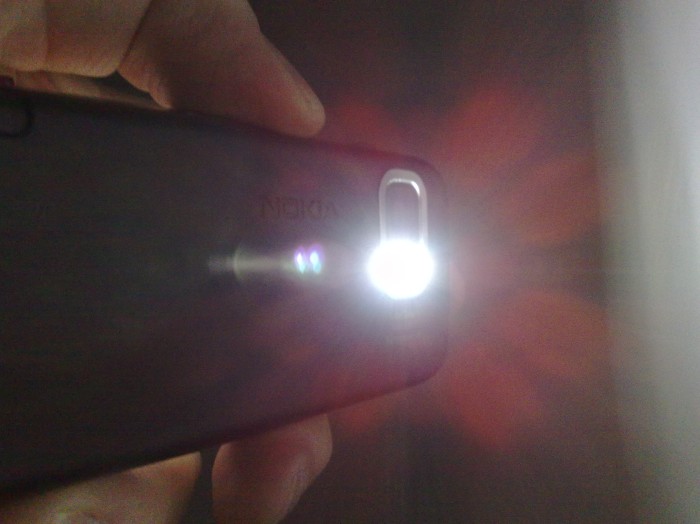
Get it from here.
google maps for nokia 5800
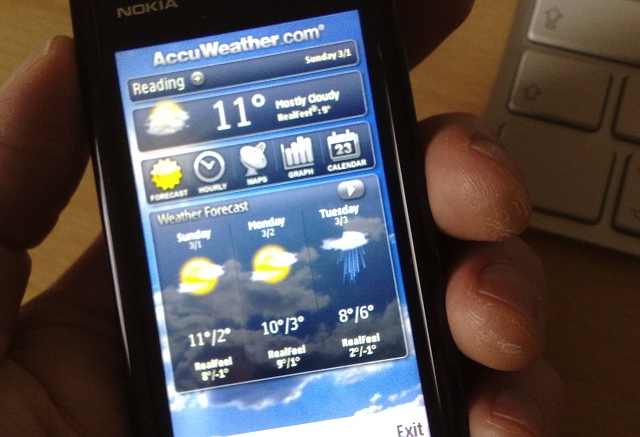
Until Nokia's own App Store finally gets up and running, 5800 XpressMusic owners are in the same boat as S60 phone owners for the last 5 years, in terms of having to scavenge a little in order to find everything that's of worth. Which is why, hopefully, articles like this will help out.
Note that in order to be considered for our Top 20 Freeware, an application must:
- be either free or at least 100% fully working in demo form, with no time restrictions
- be (at least partly) optimised for S60 5th Edition, the screen size on the 5800 and the use of the touch-screen
1. Google Maps
The first really huge third party S60 application to get a full touch makeover, this works superbly on the 5800 XpressMusic, in both landscape and portrait modes, and with touch-panning of maps and of the StreetView displays (in countries where this is supported) - it's almost like running Google Maps on the iPhone....(!)
Version 2.3 was the first to really work well, version 3.0 is now released and also has built-in Latitude (friend-finding) support.
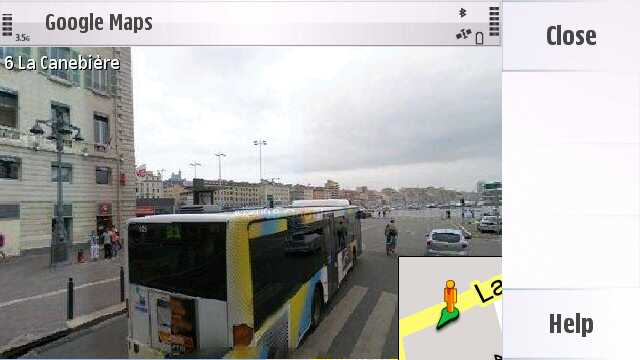
Get it at m.google.com
Top Ten Freeware Applications for Symbian S60 3rd Edition
It's been about ten months since the first S60 3rd Edition SymbianOS smartphone hit the market. Nokia made a lot of changes to the underlying OS and broke compatibility with the ~1800 S60 2nd Ed. applications that were already available. Ten months later, there are about 220 applications for the new version of S60. This is a small list of the Top-10 freeware applications for your new S60 phone.
10. PuTTY
PuTTY is a free SSH client. Especially if you own an E61/E62/E70 which come with Qwerty keyboards, this software is a must have for all you Unix guys reading this!
9. Screenshot 2
Screenshot for Symbian OS is a free program to take screenshot on your Symbian OS mobile phones. You can capture screenshot and save it to a file in JPEG, BMP, PNG or MBM format.
8. Mobile Search
Search, Find, Connect - the mobile search software for Nokia mobile phones is a simple, convenient, and fast way to find and connect to local services, websites, images, and mobile content via Yahoo!. It also supports mapping via Microsoft Local.
7. Nokia Podcasting
The Nokia Podcasting application allows you to find, subscribe to and download podcasts over the air with your Nokia N91. After downloading a podcast, you can listen to or watch it when you want.
6. DivX Player
A great DivX player, requires free registration. Can playback 320kbps QVGA DivX video at 15fps without dropping any frames. Make sure you get at least the 0.85 version or above.
5. QRreader
QReader is a high quality ebook reader, easy and powerful. It supports plain text (.txt), Palm DOC (.prc and .pdb), TCR, FB2 and UMD files reading. Alternatively, check the MobiPocket Reader.
4. Y-Browser
Y-Browser is a file manager for Symbian OS devices. It implements most standard features on files (such as copy, cut, paste, etc) & folders (create, remove, etc) and it allows you to work with "hidden, system" folders. Its addons are very unique compared to other free file managers (like SExplorer or SysExplorer), because they allow you to save to the filesystem files that were sent via Bluetooth and got stuck in Messaging.
3. Internet Radio
The application supports SHOUTcast streaming audio playback. Currently, MP3 and AAC+ streams are supported. The application also supports local playback of audio files in the following formats: MP3, AAC, eAAC+, MP4, M4A, WMA, 3GPP, AMR, and WAV. Note that some formats may not be supported on some S60 products.
2. Adobe PDF Reader
With the application you can read PDF documents on the display of your device. Documents can be accessed and opened in the following ways:
* Opening an email attachment from received e-mail messages (network service)
* Document sent using Bluetooth technology to your Inbox in Messgaing
* Using the File manager to browse and open documents stored in the phone memory and on memory card
* Browsing Web pages
1. Autolock
AutoLock is a free automatic key lock application. It will turn key lock on after certain amount of time of inactivity. For some weird reason, some of Nokia's new phones don't do that automatically.
From all the above applications, only the #1 and #2 are not available for the S60 2nd Edition phones.
Honorable Mentions:
* Zip Manager
Zip Manager is a powerful and easy-to-use file compression program for the Nokia E61. ZIP Manager allows you to handle zip files in a convenient way. It offers a graphical interface to add, extract, and open files, as well as toperform other commands. The reason this is not in the top-10 is because I am not sure is truly free. It came for free in my E61, and its package is freely available, I am just not sure if it will work freely in all other phone models too. Try and see.
* Still Image Editor
Edit your megapixel images by adding clip art, multicolor frames, color adjustments, text, resize & rotation and much more. This application came with the Nokia 3250 but it works on other phone models too. It is not in the top10 list because I am not sure if it's a native C++ Symbian application or a J2ME one packaged in a Symbian package. To use this application after installation, open your image with your Gallery/Images application and then from the menu choose "Edit".
And speaking about J2ME, here is the list with the best Java applications (not games) that you can use in *any* phone model today! That page is mobile-friendly so you can directly use it with your cellphone.
Enjoy your applications ahoy!
Top 10 Freeware-May 2009 by me
Programs listed alphabetically
1. AnalogX LinkExaminer
Version 1.01, release date: May 6, 2009
AnalogX LinkExaminer at its core is a link checker, it goes through each and every page (assuming you have it set to) and parses the HTML in order to extract the links existing on the page. While it's parsing the page, it can also perform other checks; from simple tasks like extracting the page title, to SEO analysis, to more advanced tasks like identifying pages with high similarity to other pages. Once it's done, you can go over the results in the GUI, then export to a variety of formats including CSV and Google-compatible XML sitemaps. It also boasts a template-based HTML report generation engine, that allows you to make completely custom report to focus on the aspects of the scan that are most critical to you.
2. Autoruns
Version 9.5, release date: May 7, 2009
This utility, which has the most comprehensive knowledge of auto-starting locations of any startup monitor, shows you what programs are configured to run during system bootup or login, and shows you the entries in the order Windows processes them. These programs include ones in your startup folder, Run, RunOnce, and other Registry keys. You can configure Autoruns to show other locations, including Explorer shell extensions, toolbars, browser helper objects, Winlogon notifications, auto-start services, and much more.
3. Blender
Version 2.49, release date: May 30, 2009
Blender, the open source software for 3D modeling, animation, rendering, post-production, interactive creation and playback. Available for Windows, Linux, Irix, Sun Solaris, FreeBSD or Mac OS X.
4. CleanAfterMe
Version 1.35, release date: May 15, 2009
CleanAfterMe allows you to easily clean files and Registry entries that are automatically created by the Windows operating system during your regular computer work.
With CleanAfterMe, you can clean the cookies/history/cache/passwords of Internet Explorer, the 'Recent' folder, the Registry entries that record the last opened files, the temporary folder of Windows, the event logs, the Recycle Bin
, and more.
CleanAfterMe is a portable application. This means that you can run it without any installation and without leaving any trace in the Registry.
You can also run this program from a USB flash drive: In order to do that, simply copy the executable file of CleanAfterMe (CleanAfterMe.exe) into the USB flash drive, and run it from there.
5. HelpNDoc
Version 2.0, release date: May 27, 2009
HelpNDoc lets you generate help files in various formats from a single source.
- CHM: Compiled Microsoft Windows HTML Help;
- HTML: Complete web help optimized for easy online browsing and search engines;
- DOC: Complete help documentation as a Microsoft Word document or RTF file;
- PDF: Standard Adobe portable document format documentation for easy sharing and printing.
6. HWiNFO32
Version 2.40, release date: May 13, 2009
A powerful system information tool for Windows.
- Comprehensive hardware information
- System health monitoring (Thermal, Voltage, Fan, Power)
- Basic benchmarks
- Text, CSV, XML, HTML, MHTML report formats
- Periodical updates
- OS: Windows 9x/2000/XP/Server 2003/Vista/Server 2008/Windows 7
- Platform: 32-bit (IA-32), 64-bit (x64, IA-64)
7. MJ Registry Watcher
Version 1.2.6.8, release date: May 25, 2009
MJ Registry Watcher is a simple registry, file and directory hooker/poller, that safeguards the most important startup files, registry keys and values, and other more exotic registry locations commonly attacked by trojans. It has very low resource usage, and is set to poll every 30 seconds by default, although you can adjust this to anywhere between 0 and 9999. A configuration file stores all your settings for future use. MJRW not only polls the system, but it also hooks it, so that most changes to keys, files and directories are reported instantaneously. Key deletions are still caught by the polling loop though, since they cannot be hooked.
8. PopCorn
Version 1.92, release date: May 18, 2009
PopCorn is a freeware ultra-lightweight POP3/SMTP e-mail client It works as a client/server application, reading mail 'directly' from POP3 servers. It is ideally suited for 'on the road' mail access, for scanning, reading and sending mail over slow connections. It supports multiple user profiles, enabling you to read and send mail from any number of accounts. It requires no installation, no data is saved locally other than a portable .INI file containing account information. It is ideal for cleaning up POP3 accounts, removing spam, unwanted mail, large attachments etc... It has a mail editor allowing you to compose and send new mail, reply to, forward and re-direct received mail. It fits easily on a floppy or other portable (even read only) media, making it easy carry around at all times.
9. RegDllView
Version 1.35, release date: May 28, 2009
RegDllView is a small utility that displays the list of all registered dll/ocx/exe files (COM registration). For each registered file, you can view the last date/time that it was registered, and the list of all registration entries (CLSID/ProgID).
RegDllView also allows you to unregister dll/ocx files that you don't need on your system anymore. If you have dll/ocx files that don't exist on your system anymore, but their registration entries are still exist in your Registry, you can manually remove these entries by using 'Delete All Entries For Selected Files' option.
10.
Roadkil's Disk Image
Version 1.5, release date: May 23, 2009
Creates and writes disk images files to hard and floppy disks. Great for writting boot disk images download from the internet or creating a perfect copy of a disk to email to someone else.
check it n try it...
Top 10 Freeware Software Nobody Knows About - But Should
It’s always a shame when a great program is not heard about by most people - especially when it’s free. Here are the top 10 freeware software that many people still haven’t tried, but definitely should.
10. Sharepod
If you want to get all those files off your iPod and into your computer, then this is the program for you. In a previous post (Transfer Files From Your iPod To PC For Free) Sharepod was used to show how to freely and easily transfer files from an iPod to PC.
SharepodMain
9. ConTEXT
Not only is this a great notepad replacement, it is also a great help for software developers.
Context
8. IrfanView
Simply put, this is a simple graphic viewer. It has many essential features like email, Thumbnail/preview option, various Effects, changing color depth, and, of course, an extensive file format support.
IrfanView
7. Windows Live Writer
Although still in beta, this makes blogging both easy and comfortable. It supports many blog services, including WordPress, Blogger, and TypePad, and also has a some very good plugins.
writer_screenshot
6. Foxit Reader
This is the adobe reader replacement. It is much faster than adobe reader, and much friendlier to use. Try this once, and you’ll never go back.
Foxit
5. Snipping Tool
Comes installed in Windows Vista. This program lets you take screenshots of the whole screen, only a certain program, free-form, or rectangular snips. Immediately after taking the screen shot, you are given the choice of editing it and saving it into your computer. They couldn’t have made it easier. This was also covered in a previous post: Top 5 Applications That Come Installed With Windows Vista
SnipTool
[Edit: Some people pointed out that this isn’t necessarily freeware because you need to have Vista in order to use it. MWSnap can be used instead of it. Thanks TemporalBeing and everyone else who pointed that out.]
4. Blender
Did you ever see the amazing CGI movies Pixar makes, like Ratatouille? Well, with Blender, you can make similar computer generated graphics that will amaze everyone.
blender
3. ImgBurn
ImgBurn is great tool to create image files from discs and burn images to discs. It even supports HD DVD and Blu-ray. There is no need to use an high cost programs for images.
ImgBurn
2. MusikCube
This is what iTunes should be like. An easy to use, uncluttered, lightweight program, which will convert most people to it after seconds of use. The plugins that are available will make for an easy transition, like being able to grab ratings from iTunes or Windows Media Player and import them to MusikCube. MagikCube
1. AutoHotkey
This is the one of the most essential programs ever - if you know how to use it. With AutoHotkey, you can write scripts that automate keystrokes, which can save you a lot of time. You can make it automate annoying internship jobs, like copying and pasting a bunch of text from one place to another, to more complex applications like Lifehacker’s Texter. The beauty of it all is that it very easy to learn and master.
autohotkey
PeaZip Portable 2.6.1
PeaZip Portable is the easy to use PeaZip file archiver packaged as a portable app, so you can take your file archiver with you and work with your compressed 7z, ZIP, GZIP, BZIP2, TAR, RAR files and more on the go.
Features:
Edit, save and restore archive layouts
Supported formats:
Pack / unpack: 7Z, ARC, BZ2, GZ, PAQ/LPAQ, PEA, QUAD, TAR, UPX, and ZIP
Unpack only: ACE, ARJ, CAB, DEB, ISO, LHA, RAR, RPM and more archive types...
Apply multiple filters to archive contents
Archive splitting and joining
Encryption and secure deletion
File comparison and checksum / hash (CRC, MD5, SHA...)
Download Here
DVD Slideshow GUI 0.9.1.6
DVD slideshow GUI offers a very simple way to make your own slideshows. Just import your images, export them as an authored DVD-image(.iso) and burn it!
But DVD slideshow GUI offers much more:
180 different types of transitions.
Animate your overlapping images using zoom, pan and rotate.
Add videos(avi/avs) to you slideshow.
Add music, motion backgrounds, borders and subtitles.
Export to dvd video, dvd audio, dvd chapters, dvd subtitles, avi, flash, avisynth script, storyboards, single images with backgrounds, etc.
You can even make and add your own transitions(grayscale bitmaps or in avisynth code) and Post effects(avisynth code) and share them through the forum.
Import any type of image, any size.
Change image order move, copy, paste for one or more slides.
Code your own avisynth transitions.
Random transition.
Add your own avisynth, Free Frame, Photoshop CHA/AMP effects.
Import Exif data with photos.
What's New in version 0.9.1.6:
More Presets window optimations.
Code clean up.
Max subtitle length: 168
DOWNLOAD HERE
Monday, June 1, 2009
Confirmed Date of Expected Windows 7 RTM
Before I say anything else, I will say that this informtion is based on an internal document from a close Microsoft Partner. This date has been consistent for 2 months. Of course, if there are any sort of show stoppers, this date is subject to change, and we will be sure to nofity you if there are any changes.
June 30th will be the date the code for windows 7 will be signed off and released to manufacturing. This news comes from one of Microsoft's very close partners and we here at Win7Vista are the first to provide it to you. Attached below is a graphic direct from this partner (with some modifications so we don't reveal the source, as this is obviously very confidential information). This graphic also reveals that Windows 7 will enter a code frozen RTM escrow on June 7th.
You may notice it lists the RC date as April 23. This is in fact the day the code for RC was signed off, 2 days later than it was built. We have no way of telling you the exact date the RTM willl be built, but we expect it to be 1-2 days before the sign off date of June 30. This date comes as no surprise as Microsoft tends to have a habit of signing off RTMs on the last day of the month.
best free webhosting
Hi all,
I think this information can be useful for you. If you plan to get your website, here is one good free web hosting provider to choose - 000webhost.com
They provide hosting absolutely free, there is no catch. You get 1500 MB of disk space and 100 GB bandwidth. They also have cPanel control panel which is amazing and easy to use website builder. Moreover, there is no any kind of advertising on your pages.
You can register here:
000Webhost.com - - -THE BEST FREE WEBHOSTING ON THE PLANET---
setelah lama belajar ngeblog akhirnya sekarang saatnya belajar bikin website beneran...
berhubung masih belajar saya coba2 dulu pake webhosting gratisan.
WOOOOOOOOOOOWWW.....kaget dah saya, ternyata biar gratis 000webhost.com itu menyediakan fasilitas yang ga kalah dibanding hosting2 berbayar.
saya jamin anda -anda ga bakalan kecewa dengan webhosting gratis yang satu ini....
yang mau coba,gabung aja langsung ke 000webhost.com di sini
1
2
3
goooooo...jadi deh website bikinan sendiri,bukan sekedar BLOG.
THE BEST FREE WEBHOSTING ON THE PLANET
setelah lama belajar ngeblog akhirnya sekarang saatnya belajar bikin website beneran...
berhubung masih belajar saya coba2 dulu pake webhosting gratisan.
WOOOOOOOOOOOWWW.....kaget dah saya, ternyata biar gratis 000webhost.com itu menyediakan fasilitas yang ga kalah dibanding hosting2 berbayar.
saya jamin anda -anda ga bakalan kecewa dengan webhosting gratis yang satu ini....
yang mau coba,gabung aja langsung ke 000webhost.com di sini
goooooo...jadi deh website bikinan sendiri,bukan sekedar BLOG.
Subscribe to:
Comments (Atom)

